Companion watch face
EmergencyAid Face
The free watch face for EmergencyAid. A clear red banner on your wrist tells anyone who looks at your watch that it carries an emergency card, and on a touch watch a hold on the banner opens EmergencyAid.
Get EmergencyAid Face on the Connect IQ Store
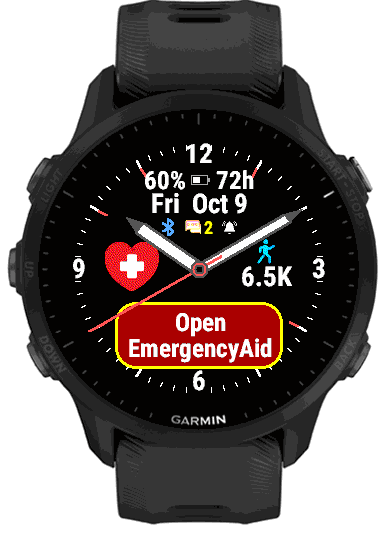
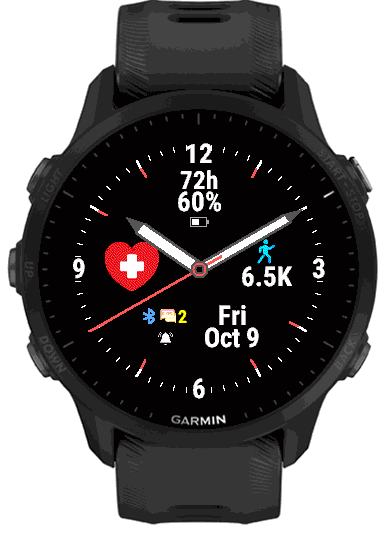
What is on the face
- The banner
- A red banner across the bottom of the dial. Its two messages take turns every two seconds, Open EmergencyAid and For Emergency Information. On a touch watch, hold the banner to open EmergencyAid. It is also the thing a stranger notices first.
- EmergencyAid’s icon
- At 9 o’clock. Hold it to open the app, even when the banner is hidden.
- The dial
- Hour, minute and second hands, a 60-minute track and 12, 3, 6 and 9 at the bezel. Battery with the days or hours left, the date with the day and month in your watch’s language, a Bluetooth mark for your phone, and today’s steps at 3 o’clock. Unread notifications show as a count, and a bell shows when an alarm is set.
- Hold to peek
- On a touch watch, hold anywhere except the banner and the icon. The banner steps aside for a few seconds and the details move clear of the hands, so you can read what the hands were covering.
Settings
There is one setting, Banner: show it or hide it. Change it in the Garmin Connect IQ app on your phone, or in the face’s own settings on the watch. If you would rather carry the face without the banner, hide it. Holding the EmergencyAid icon still opens the app.
Remember that anyone who holds the banner on your wrist can reach what you have entered in EmergencyAid. That is the point in an emergency, and it is the reason the switch is there.
Watches and languages
The face runs on the same 72 Garmin watches as EmergencyAid (see Supported Watches). It uses your watch’s language: English, German, Spanish, Italian, French, Japanese or Traditional Chinese. A watch set to another language shows English.
Private
No network, no account. The face reads your steps, battery and notification count from the watch, draws them and keeps nothing. It has no way to read your EmergencyAid details, and it sends nothing anywhere. Its one permission lets it find EmergencyAid so that a hold can open it.